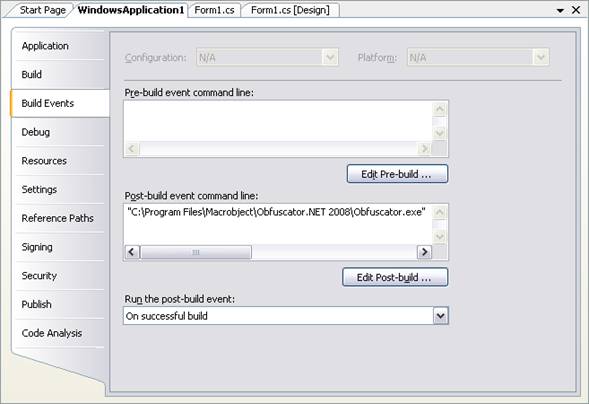
How to obfuscate an assembly automatically?
1.
Open
your source project in Visual Studio.
2.
Right
click the project in the “Solution Explorer” window and select the “Properties”
menu item to open its properties window.
3.
Click
the “Build Events” tab, copy the following command line into the “Post-build
event command line”:
"C:\Program
Files\Macrobject\Obfuscator.NET 2009\Obfuscator.exe"
/pfile="$(TargetDir)$(TargetFileName)";outfile="the output filename";auto=1;overwrite=1
Or you can use the existing Obfuscator.NET project file:
"C:\Program
Files\Macrobject\Obfuscator.NET 2009\Obfuscator.exe" /pfile="the Obfuscator.NET Project.mobfproj";auto=1;overwrite=1
Note: Please change the
output filename or the Obfuscator.NET Project.mobfproj to
yours.
4.
The
assembly will be obfuscated automatically when you rebuild the project.
Please see “Using Command Line” for command-line information.